Log an agent out of Genesys Cloud
Log out an agent
Log out an agent in the following views:
Important: When you log out an agent, all active connections will be ended.
Note: Supervisors can log out agents, including agents who are logged in through SSO. When a supervisor logs out an agent, Genesys Cloud disassociates the agent’s station only if the supervisor has the Telephony > Station > Disassociate permission. Otherwise, the agent remains associated with the station after logout. If the agent logs out from the Genesys Cloud web or desktop app, Genesys Cloud disassociates the station only if the agent has the Telephony > Station > Disassociate Self permission. Otherwise, the station remains associated, allowing the agent to continue answering ACD calls on a mobile device.
Here’s an example of how to log an agent out of Genesys Cloud in the Queues Activity Detail view.
To log an agent out of Genesys Cloud, complete the following steps:
- Go to Performance > Queues Activity.
- Click Menu > Analytics > Analytics Workspace.
- Click and select Queue Activity.
- Select a queue in which the agent is a member.
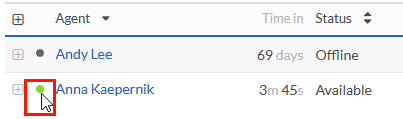
- From the queue's activity detail view, hover over the presence dot beside an agent's name.
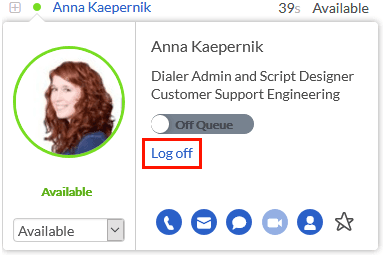
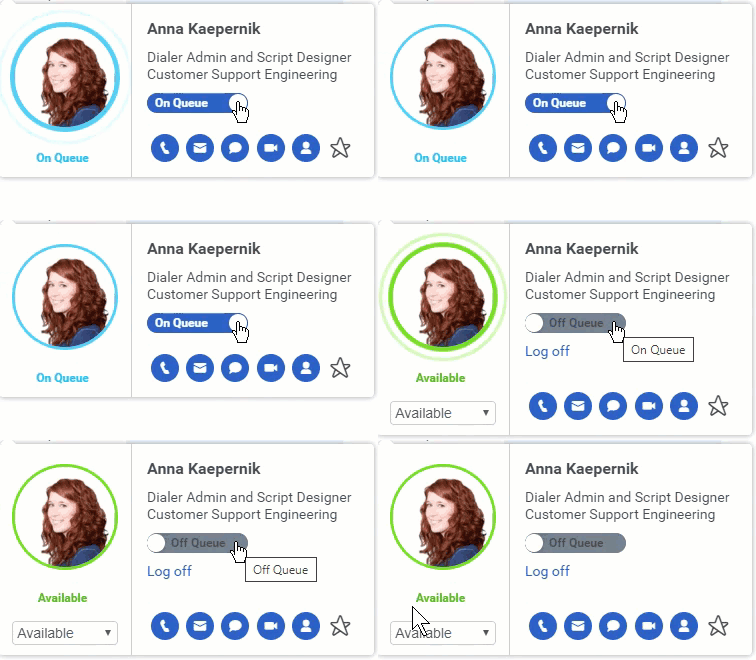
- To log out an agent, click Log off. If the agent is On Queue, set the agent's status to Off Queue, and then click Log off.
Note: To display the Log off option when the agent is On Queue, click On Queue.
[NEXT] Was this article helpful?
Get user feedback about articles.