Call Digital Bot Flow action
Use the Call Digital Bot Flow action to create a new Genesys Digital Bot Flow, or to integrate an existing Genesys Digital Bot Flow into your message flows, including in-queue message flows. You can also add a Call Digital Bot Flow action within a digital bot flow to transfer control to another digital bot flow. This allows multiple digital bots to work together as part of a single interaction without routing back through message flows. Each digital bot can focus on a specific part of the conversation while contributing to a unified experience. For more information about the configuration and limits that apply when a bot calls another bot, see Bot flow orchestration.
To access the Call Digital Bot Flow action, follow these steps:
- Open an existing message flow or digital bot flow, or create a new one.
- Click an existing state or task, or create a new one.
- From the Architect toolbox, click the Bot menu and drag a Call Digital Bot Flow action into the editor.
- Configure the action according to your design.
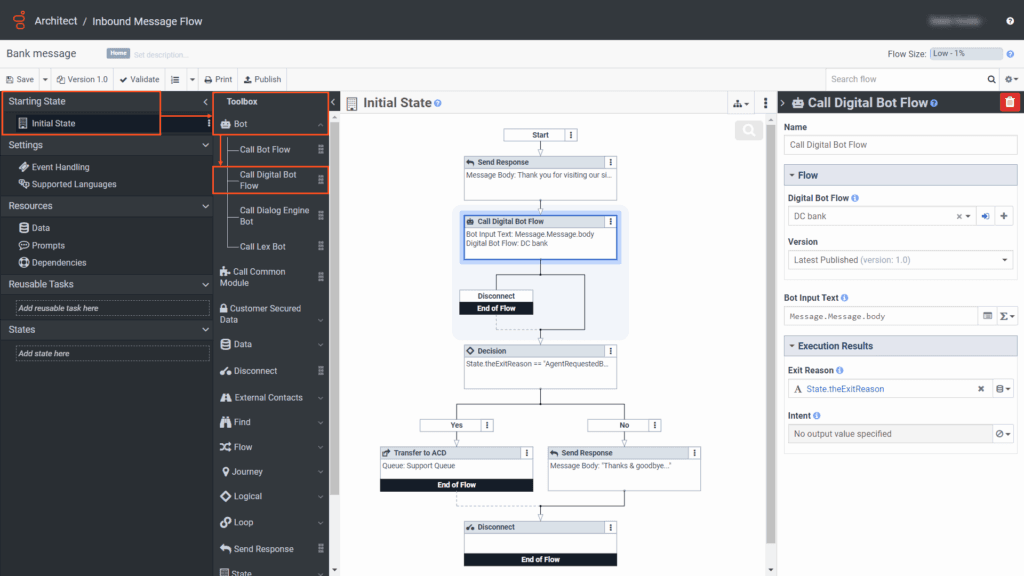
Call Digital Bot Flow action configuration
| Field | Description |
|---|---|
| Name | Type a distinctive name for the Call Digital Bot Flow action. The label you enter here becomes the action’s name displayed in the flow structure. |
| Digital Bot Flow | Select the existing digital bot flow that you want to use in the flow.
|
| Version | Select to use the most recently published version, or use a previously published version. By default, the most recently published version is selected. |
| Inputs | (Optional) Add input variables for the configured slots. Input variables are not necessary if you do not use the variables within the current flow. |
| Outputs | (Optional) Add output variables for the configured slots. Output variables are not necessary if you do not use the variables within the current flow. |
| Bot Input Text | Supply an initial utterance that the bot processes after the first Ask action in the digital bot flow. |
| Execution Results | Exit Reason indicates what caused the bot flow to exit. See the Execution results: Exit reasons section for details. Intent returns from the bot flow at runtime. If the flow does not detect an intent, the variable bound in the Intent setting defaults to a NOT_SET String at runtime. |
[NEXT] Was this article helpful?
Get user feedback about articles.