AI-generated summary
Genesys Cloud's Send Response action enables configuration of messages for SMS and messaging channel communications within chat or message flows, supporting both simple and complex message construction methods. Users can assign distinctive names for task sequence identification and select message styles for chat widgets, including "Notice" for announcements and "Standard" for general messaging. Message composition accommodates direct expression entry, message builder menu options, or the Edit Message Body dialog box for advanced expressions, with the String Builder dialog box enabling combination of data, expressions, prompts, and text elements.
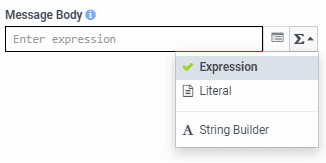
The action is deployed by dragging it from the Toolbox into the appropriate location within the task editor for message or email flows. The Message Body field accepts expressions or literal text strings, with the message builder menu providing additional configuration options. For complex message construction, users can select Expression mode to access the Edit Message Body dialog box or choose String Builder to combine multiple elements.
The Send Response action supports attachments of response assets including images, audio, video, and files up to 100 MB in size through either Expression mode using functions like MakeList and FindResponseAsset, or Literal mode using the guided interface to select from the assets library or upload new assets. Users can attach up to 10 response assets stored as a Response Asset Collection; however, the action enters error handling mode if attachments exceed five in inbound and in-queue message flows. Channel-specific file size limitations may apply to certain attachment types. Genesys Cloud supports dynamic values for attachments through Response Asset variables configured via the Update Data action.
The platform enables users to configure message sequences and manage response automation within the Architect workflow system, including inbound message flows, message body editing capabilities, and task or state editor actions such as Get Response and Get Auto Reply functions. Additional resources are available through community support, and users can provide feedback on documentation through role-based categories including Agent, Administrator, Developer/Engineer, Partner, Supervisor, and Support roles.