Overview of the People page
The People page functions as a centralized dashboard for managing user profiles and permissions within your organization. It provides a comprehensive overview of your users and allows you to:
- Manage users
- Invite users
- Add users
- View user profiles
- Assign roles and permissions
- Set user status
- Assign queues, skills and divisions
To access the People page in Genesys Cloud, navigate to Menu > User Management > Users. The People page displays all the users in your organization.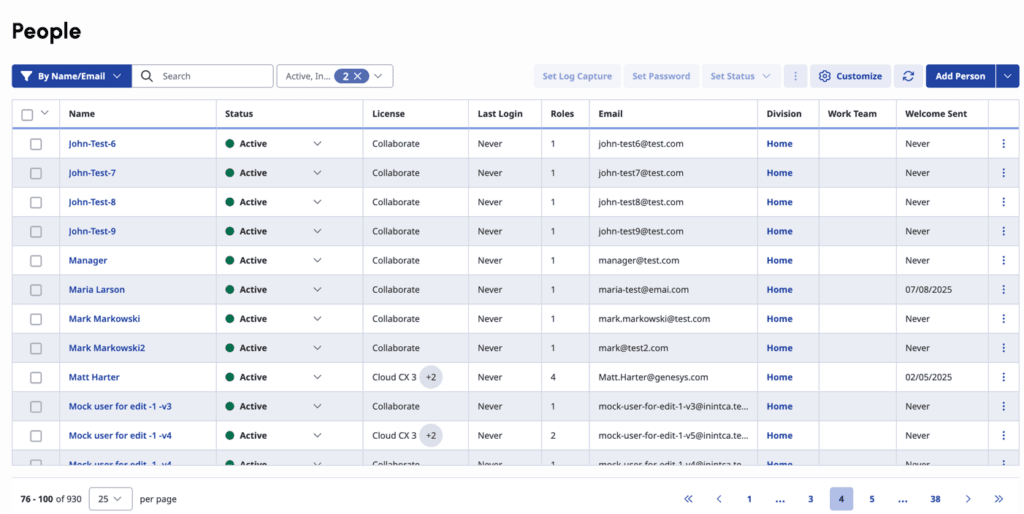
Customize the columns
The People page displays several columns to provide a comprehensive view of your users. You can vary the columns that you want to display depending on your requirements. Click the Customize button at the top and edit the columns.
| Columns | Action |
|---|---|
| Name | The existing user. Click the corresponding link and open the Edit User page for this user. Here, you can manage roles, divisions and licenses, ACD skills, queues, and user details. You can also view the user’s current permissions. |
| Status | The statuses Active, Inactive or Deleted displays for each user. |
| The email address associated to this user. | |
| License | The current license assigned to the user. Hover over the and view add-on options assigned to the user. |
| Last Login | The most recent date in which the user logged in to Genesys Cloud, or if the user has never logged in. |
| Roles | The number of roles assigned to the user. |
| Division | The division in which the user object data belongs. |
| Work Team | The work team to which this user belongs. |
| Welcome Sent | The date an administrator sent the user an invitation to join Genesys Cloud. |
Manage individual users
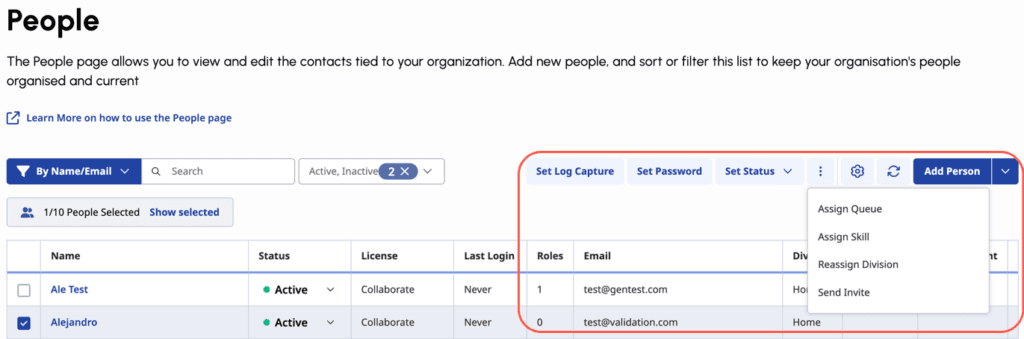
In addition to customizing columns, you can act on individual users directly from the table. For each user row, click the More icon and select from the following options:
- Assign Queue
- Assign Skill
- Reassign Division
- Set Password
- Set Log Capture
- Reset MFA
- Send Invite
When you select one or more users, these same options become available at the top of the People table, allowing you to apply them in bulk.
Filter users
To help you quickly locate specific individuals or groups, the People page includes the following filter options:
- By Name or Email
- By Group
- By Role
- By Location
- By Division
- Reports to
- By Status – Active, Inactive or Deleted

For more information, see About people and permissions.
[NEXT] Was this article helpful?
Get user feedback about articles.