Genesys Cloud provides comprehensive network connectivity solutions through dedicated CIDR blocks that consolidate IP address ranges for outbound connections to telephony endpoints, reducing firewall configuration complexity while enhancing security. The platform implements four primary CIDR address ranges for commercial regions (52.129.96.0/20, 169.150.104.0/21, 167.234.48.0/20, 136.245.64.0/18) spanning Americas, EMEA, and Asia Pacific locations, with separate ranges for specialized deployments including FedRAMP Core (164.152.64.0/22) and European Sovereign Region (158.94.160.0/22).
These CIDR blocks apply to WebRTC stations, Polycom stations with Genesys Cloud Voice or BYOC Cloud, ACD screen recording, video chat, BYOC Premises Edge Appliances, and TURN services. Traffic profiles specify WebRTC clients require STUN on tcp/udp port 3478 and media services on udp/16384-65535 for RTP traffic, while hardware phones require SIP signaling on tcp/8061 and tcp/5061 with media transport on udp/16384-65535. Organizations must add complete CIDR block IP addresses to firewall allowlists to prevent service disruptions.
Genesys Cloud provides network diagnostic testing capabilities across 14 global regions through the WebRTC Diagnostics App and command-line tests, validating DNS resolution, STUN/TURN protocols, and RTP port ranges. Testing must be performed against destination FQDNs across three geographic regions: Americas, EMEA, and Asia Pacific. Manual testing can be conducted using standard network tools such as netcat and nmap (version 7.9 or later), with specific commands and expected responses documented for each protocol and port combination. Users must maintain active Genesys Cloud authentication and disconnect persistent connections before running diagnostics.
For AWS Direct Connect customers, Genesys CIDR blocks must be permitted in route filtering using prefix-lists and community tags (7224:8100), with support for segmented subnets. AWS may segment a Genesys /20 CIDR block into smaller subnets; prefix-lists should permit the parent prefix and any smaller prefix up to /32. Customers without route filtering require no configuration changes but should verify CIDR block visibility in route tables.
Recent infrastructure updates include CIDR expansion across all regions as of May 2025, FedRAMP CIDR release in August 2024, new regional endpoints (Osaka, Zurich, UAE, Singapore), UDP port expansion to 16384-65535, and migration from static TURN IP lists to dynamic Genesys Cloud CIDR ranges. Firewall configuration issues identified during testing should be resolved by referencing recommended port and services settings, with Product Support available for unresolved connectivity problems.
Feature coming soon: Genesys Cloud European Sovereign Region
Genesys Cloud’s cloud media services CIDR block provides you with a small range of IP addresses for outbound connections to and from telephony endpoints. Having a smaller range of Genesys-owned IP addresses for all the Genesys Cloud media services means a reduced number of allowed connection targets on your organization’s firewall and, because all the IP addresses are owned by Genesys, ultimately improves security.
The Genesys Cloud CIDR is applicable to the following Genesys Cloud services:
WebRTC stations
Polycom stations with Genesys Cloud Voice or BYOC Cloud
BYOC Cloud
ACD screen recording
Video chat
BYOC Premises Edge Appliances (using WebRTC and Hybrid Media)
Core and Satellite commercial regions use the following CIDR address ranges:
52.129.96.0/20
169.150.104.0/21
167.234.48.0/20
136.245.64.0/18
You must add the full set of CIDR block IP addresses to your existing firewall allowlist in order for Genesys Cloud to function properly.
Warning: If you don't add the full set of CIDR block IP addresses to your existing firewall allowlist, you will encounter service disruptions due to the inability to reach all Genesys Cloud services.
Americas
EMEA
Asia Pacific
US-West (Oregon)
US-East (N.Virginia)
Canada (Central)
South America (Sao Paulo)
Mexico (Central)
Europe (Frankfurt)
Europe (Dublin)
Europe (London)
Europe (Zurich)
Europe (Paris)
Middle East (UAE)
Africa (Cape Town)
Asia Pacific (Sydney)
Asia Pacific (Tokyo)
Asia Pacific (Seoul)
Asia Pacific (Mumbai)
Asia Pacific (Osaka)
Asia Pacific (Hong Kong)
Asia Pacific (Singapore)
Asia Pacific (Jakarta)
Full support of Genesys Cloud's cloud media services CIDR block in this region.
Satellite region
Readiness tests for commercial regions
The following sections contains tests that allow you to confirm your organization's readiness for the CIDR IP address range and the RTP ports. Genesys recommends that you run the tests for each Genesys Cloud feature that your organization uses.
If you use WebRTC phones in your organization, the tests in this section allow you to confirm WebRTC client readiness for the CIDR IP address range and RTP ports. You need to run these tests on the same networks in which your Agent WebRTC clients operate.
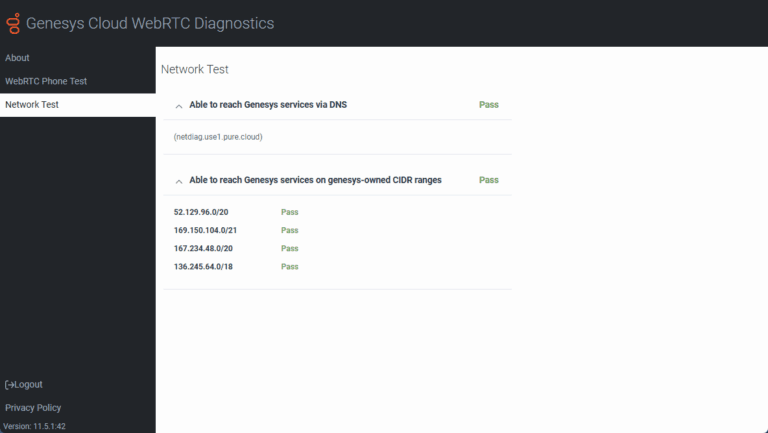
The Network Test verifies that your network can access the Genesys media servers. More specifically, these tests confirm that DNS resolution is working and that you are able to connect to the public AWS pool and to the new Genesys Cloud cloud media services CIDR IP range.
The advanced command line tests are designed for network professionals. These tests verify DNS resolution, STUN/TURN, and RTP port range. (The tcp/3478, udp/3478, and udp/16384-65535 destination transport protocols/ports.)
To ensure that the entirety of the address range is covered, you must run these tests against each one of the following destination FQDNs shown in this table - regardless of your home region.
Americas
EMEA
Asia Pacific
netdiag.use1.pure.cloud
netdiag.usw2.pure.cloud
netdiag.cac1.pure.cloud
netdiag.sae1.pure.cloud
netdiag.euc1.pure.cloud
netdiag.euw1.pure.cloud
netdiag.euw2.pure.cloud
netdiag.euc2.pure.cloud
netdiag.euw3.pure.cloud
netdiag.mec1.pure.cloud
netdiag.afs1.pure.cloud
netdiag.apse2.pure.cloud
netdiag.apne1.pure.cloud
netdiag.apne2.pure.cloud
netdiag.aps1.pure.cloud
netdiag.apne3.pure.cloud
netdiag.ape1.pure.cloud
netdiag.apse1.pure.cloud
netdiag.apse3.pure.cloud
The following tables provide you with a set of cloud platform network connectivity diagnostic endpoints that you can use to test against. To perform the manual tests, you can use commonly available network connectivity tools, such as netcat and nmap.
Note: These tests are for guidance purposes only and are intended for network and firewall experts.
Destination protocol / port
Sample test command
Successful response
Failed response
tcp/3478
nc -v netdiag.use1.pure.cloud 3478
No specific response is displayed, but a successful connection handshake is indicated.
(This command sends five packets, which result in five "Goodbye" responses; one for each packet.)
You do not receive a "Goodbye" response.
Use the following table as a reference for the Genesys CIDR traffic profile for WebRTC clients.
Services
Source
Destination address
Destination transport protocol/port
Description
STUN
WebRTC Client
52.129.96.0/20
169.150.104.0/21
167.234.48.0/20
136.245.64.0/18
tcp/3478
udp/3478
Identifies the public IP address of the WebRTC Client.
Media
WebRTC Client
52.129.96.0/20
169.150.104.0/21
167.234.48.0/20
136.245.64.0/18
udp/16384-65535
Media sent to Genesys Cloud TURN or media services.
If you use hardware phones in your organization, these tests allow you to confirm hardware phone readiness for the CIDR IP address range and RTP ports. You need to run these tests on the same networks in which the hardware phones operate.
The advanced command line tests are designed for network professionals. These tests verify DNS resolution, signaling, and RTP port range. (The tcp/8061, tcp/5061, and udp/16384-65535 destination transport protocols/ports.)
To ensure that the entirety of the address range is covered, you must run these tests against each one of the following destination FQDNs shown in this table - regardless of your home region.
Americas
EMEA
Asia Pacific
netdiag.use1.pure.cloud
netdiag.usw2.pure.cloud
netdiag.cac1.pure.cloud
netdiag.sae1.pure.cloud
netdiag.euc1.pure.cloud
netdiag.euw1.pure.cloud
netdiag.euw2.pure.cloud
netdiag.euc2.pure.cloud
netdiag.euw3.pure.cloud
netdiag.mec1.pure.cloud
netdiag.afs1.pure.cloud
netdiag.apse2.pure.cloud
netdiag.apne1.pure.cloud
netdiag.apne2.pure.cloud
netdiag.aps1.pure.cloud
netdiag.apne3.pure.cloud
netdiag.ape1.pure.cloud
netdiag.apse1.pure.cloud
netdiag.apse3.pure.cloud
The following tables provide you with a set of cloud platform network connectivity diagnostic endpoints that you can use to test against. To perform the manual tests, you can use commonly available network connectivity tools, such as netcat and nmap.
(This command sends five packets, which result in five "Goodbye" responses; one for each packet.)
You do not receive a "Goodbye" response.
Use the following table as a reference for the Genesys CIDR traffic profile for hardware phones.
Services
Source
Destination address
Destination transport protocol/port
Description
Signaling
Hardware Phone
52.129.96.0/20
169.150.104.0/21
167.234.48.0/20
136.245.64.0/18
tcp/8061
tcp/5061
SIP signaling between the hardware phone and cloud platform SIP services.
Media
Hardware Phone
52.129.96.0/20
169.150.104.0/21
167.234.48.0/20
136.245.64.0/18
udp/16384-65535
Media sent to Genesys Cloud media services.
If you use BYOC Cloud for your telephony connection, these tests allow you to confirm BYOC Cloud's readiness for the CIDR IP address range and RTP ports. You need to run these tests on the same networks where the remote end of the BYOC Cloud trunk is terminated. (For example, SBC's or PBX’s network.)
The advanced command line tests are designed for network professionals. These tests verify RTP port range. (The udp/16384-65535 destination transport protocols/ports.) SIP is not included in this set of tests as the BYOC Cloud SIP Proxies do not run on the Genesys CIDR address range.
To ensure that the entirety of the address range is covered, you must run these tests against each one of the following destination FQDNs shown in this table - regardless of your home region.
Americas
EMEA
Asia Pacific
netdiag.use1.pure.cloud
netdiag.usw2.pure.cloud
netdiag.cac1.pure.cloud
netdiag.sae1.pure.cloud
netdiag.euc1.pure.cloud
netdiag.euw1.pure.cloud
netdiag.euw2.pure.cloud
netdiag.euc2.pure.cloud
netdiag.euw3.pure.cloud
netdiag.mec1.pure.cloud
netdiag.afs1.pure.cloud
netdiag.apse2.pure.cloud
netdiag.apne1.pure.cloud
netdiag.apne2.pure.cloud
netdiag.aps1.pure.cloud
netdiag.apne3.pure.cloud
netdiag.ape1.pure.cloud
netdiag.apse1.pure.cloud
netdiag.apse3.pure.cloud
The following table provides you with a set of cloud platform network connectivity diagnostic endpoints that you can use to test against. To perform the manual tests, you can use commonly available network connectivity tools, such as netcat and nmap.
(This command sends five packets, which result in five "Goodbye" responses; one for each packet.)
You do not receive a "Goodbye" response.
Use the following table as a reference for the Genesys CIDR traffic profile for BYOC Cloud.
Services
Source
Destination address
Destination transport protocol/port
Description
Media
Customer’s Carrier or PBX Device
52.129.96.0/20
169.150.104.0/21
167.234.48.0/20
136.245.64.0/18
udp/16384-65535
Media sent to Genesys Cloud media services.
If you use ACD Screen Recording and Video Chat in your organization, these tests allow you to confirm these feature's readiness for the CIDR IP address range and RTP ports. You need to run these tests on the same networks on which ACD Screen Recording and Video Chat clients are being used.
The WebRTC Diagnostics App – Network Test is a very basic test that verifies DNS resolution and general connectivity to STUN/TURN services.
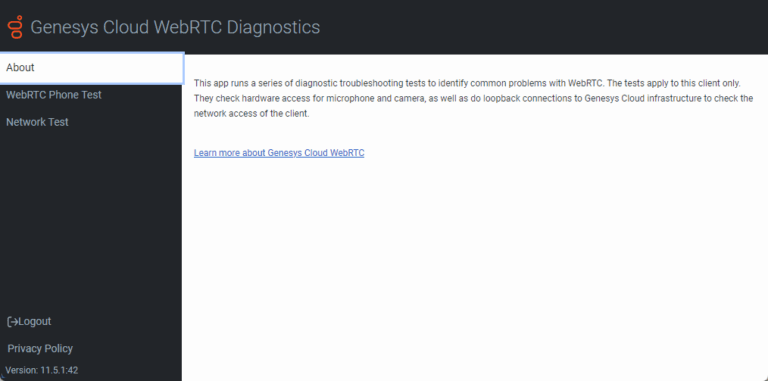
The Genesys Cloud WebRTC Diagnostics app provides you with a set of diagnostics that verifies your WebRTC configuration is properly configured and identifies potential problems.
Notes:
You must log in to Genesys Cloud to run the WebRTC Diagnostics app.
When testing CIDR, you only need to run the Network Test.
The Network Test verifies that your network can access the Genesys media servers. More specifically, these tests confirm that DNS resolution is working and that you are able to connect to the public AWS pool and to the new Genesys Cloud cloud media services CIDR IP range.
The advanced command line tests are designed for network professionals. These tests verify DNS resolution, STUN/TURN, and RTP port range. (The tcp/3478, udp/3478, and udp/16384-65535 destination transport protocols/ports.)
To ensure that the entirety of the address range is covered, you must run these tests against each one of the following destination FQDNs shown in this table - regardless of your home region.
Americas
EMEA
Asia Pacific
netdiag.use1.pure.cloud
netdiag.usw2.pure.cloud
netdiag.cac1.pure.cloud
netdiag.sae1.pure.cloud
netdiag.euc1.pure.cloud
netdiag.euw1.pure.cloud
netdiag.euw2.pure.cloud
netdiag.euc2.pure.cloud
netdiag.euw3.pure.cloud
netdiag.mec1.pure.cloud
netdiag.afs1.pure.cloud
netdiag.apse2.pure.cloud
netdiag.apne1.pure.cloud
netdiag.apne2.pure.cloud
netdiag.aps1.pure.cloud
netdiag.apne3.pure.cloud
netdiag.ape1.pure.cloud
netdiag.apse1.pure.cloud
netdiag.apse3.pure.cloud
The following tables provide you with a set of cloud platform network connectivity diagnostic endpoints that you can use to test against. To perform the manual tests, you can use commonly available network connectivity tools, such as netcat and nmap.
Destination protocol / port
Sample test command
Successful response
Failed response
tcp/3478
nc -v netdiag.use1.pure.cloud 3478
No specific response is displayed, but a successful connection handshake is indicated.
(This command sends five packets, which result in five "Goodbye" responses; one for each packet.)
You do not receive a "Goodbye" response.
Use the following table as a reference for the Genesys CIDR traffic profile for ACD Screen Recording and Video Chat.
Services
Source
Destination address
Destination transport protocol/port
Description
STUN
Genesys Cloud Client
52.129.96.0/20
169.150.104.0/21
167.234.48.0/20
136.245.64.0/18
tcp/3478
udp/3478
Identifies the public IP address of the Screen Recording and Video Chat Client.
Media
Genesys Cloud Client
52.129.96.0/20
169.150.104.0/21
167.234.48.0/20
136.245.64.0/18
udp/16384-65535
Media sent to Genesys Cloud TURN or media services.
If you use BYOC Premises for your telephony connection, these tests allow you to confirm the BYOC Premises Edge appliance's readiness for the CIDR IP address range and RTP port expansion. You need to run these tests on the same networks on which the Edge appliances are connected.
The advanced command line tests are designed for network professionals. These tests verify WebRTC and hybrid media site link capability for BYOC Premises Edge. (The tcp/5061, tcp/3478, udp/3478, and udp/16384-65535 destination transport protocols/ports.)
To ensure that the entirety of the address range is covered, you must run these tests against each one of the following destination FQDNs shown in this table - regardless of your home region.
Americas
EMEA
Asia Pacific
netdiag.use1.pure.cloud
netdiag.usw2.pure.cloud
netdiag.cac1.pure.cloud
netdiag.sae1.pure.cloud
netdiag.euc1.pure.cloud
netdiag.euw1.pure.cloud
netdiag.euw2.pure.cloud
netdiag.euc2.pure.cloud
netdiag.euw3.pure.cloud
netdiag.mec1.pure.cloud
netdiag.afs1.pure.cloud
netdiag.apse2.pure.cloud
netdiag.apne1.pure.cloud
netdiag.apne2.pure.cloud
netdiag.aps1.pure.cloud
netdiag.apne3.pure.cloud
netdiag.ape1.pure.cloud
netdiag.apse1.pure.cloud
netdiag.apse3.pure.cloud
The following tables provide you with a set of cloud platform network connectivity diagnostic endpoints that you can use to test against. To perform the manual tests, you can use commonly available network connectivity tools, such as netcat and nmap.
Destination protocol / port
Sample test command
Successful response
Failed response
tcp/5061
echo "Hello" | nc -v netdiag.use1.pure.cloud 5061
The response includes:
Goodbye
You do not receive a "Goodbye" response.
Destination protocol / port
Sample test command
Successful response
Failed response
tcp/3478
nc -v netdiag.use1.pure.cloud 3478
No specific response is displayed, but a successful connection handshake is indicated.
(This command sends five packets, which result in five "Goodbye" responses; one for each packet.)
You do not receive a "Goodbye" response.
Use the following table as a reference for the Genesys CIDR traffic profile for BYOC Premises Edge appliances.
Services
Source
Destination address
Destination transport protocol/port
Description
WebRTC Signaling
BYOC Premises Edge Appliance
52.129.96.0/20
169.150.104.0/21
167.234.48.0/20
136.245.64.0/18
tcp/5061
Control plane signaling between the Edge device and cloud XMPP Gateway.
WebRTC TURN
BYOC Premises Edge Appliance
52.129.96.0/20
169.150.104.0/21
167.234.48.0/20
136.245.64.0/18
udp/16384-65535
Media sent to Genesys Cloud TURN services.
WebRTC STUN
BYOC Premises Edge Appliance
52.129.96.0/20
169.150.104.0/21
167.234.48.0/20
136.245.64.0/18
tcp/3478
udp/3478
Used to identify a public IP address of the Edge device.
General AWS Direct Connect information
AWS advertises the Genesys CIDR block both publicly and within Direct Connect.
Direct Connect customers who are not performing route filtering have no additional changes to make. However, Genesys recommends doing a lookup on the route table to ensure you are seeing the Genesys CIDR blocks. For example, if a Genesys CIDR block has a /20 mask, AWS may segment the block into /21’s, /22’s, /23’s, /24’s, and so on.
Direct Connect customers who are performing route filtering must permit the Genesys CIDR blocks. For example, if a Genesys CIDR block has a /20 mask, AWS may segment the block into /21’s, /22’s, /23’s, /24’s, and so on.
Direct Connect customers who need to filter region specific Genesys Cloud CIDRs should use prefix-lists and community tags. The prefix-list for the /20 mask should allow /20 and any prefix less than /32, and the prefix-list for the /21 mask should allow /21 and anything less than /32. The community tag set by AWS for region specific prefixes is 7224:8100. To verify the correct community tag, see the AWS Routing policies and BGP communities section of the AWS Direct Connect user guide. By using both of these filtering techniques, customers can automatically accept regional Genesys Cloud CIDRs.
Note: The Genesys Cloud CIDR IP address ranges for Core/Satellite regions can be found at the beginning of this article.
Note: This example’s region CIDR allocation may not match what is actually advertised.
For this example, suppose that the Direct Connect circuit terminates into us-east-1 and AWS is advertising a Genesys prefix of 169.150.106.0/24 out of the us-east-1 region and 169.150.107.0/24 out of the us-west-2 region. The Direct Connect customer receives both advertisements on their us-east-1 circuit.
To filter these networks and prefer, or accept, the 169.150.106.0/24 prefix, the customer uses a prefix-list and community tag. The prefix-list should allow 169.150.104.0/21 and include any prefix less than /32. The community tag match would be for 7224:8100.
In this case, the community tag is a unique identifier for a region's route advertisements from AWS. The community tag set by AWS allows a customer to differentiate routes from region, continent, or global. Therefore, the applied filters would cause the us-east-1 prefix, 169.150.106.0/24, to be matched on the Direct Connect circuit in us-east-1. The us-west-2 prefix, 169.150.107.0/24, would not be matched and could be dropped or set as a least preferred path.
IP address information for the FedRAMP region
The FedRAMP Core region (US-East 2 (Ohio)) uses the following CIDR address range:
164.152.64.0/22
Readiness checks for the FedRAMP region
To help new FedRAMP customers prepare to use the CIDR block of IP addresses, Genesys provides two ways to confirm whether you are ready to use the CIDR block of IP addresses or need to make further adjustments to your firewall settings.
You can access the Genesys Cloud WebRTC Diagnostics app and run the automated tests found on the Network Test tab. For more information, see Troubleshooting in the About WebRTC article.
You can run the set of manual tests described below.
Genesys provides you with a set of cloud platform network connectivity diagnostic endpoints that you can use to test against. To perform the manual tests, you can use commonly available network connectivity tools, such as netcat and nmap.
You will run the tests against the FedRAMP destination FQDN:
netdiag.use2.us-gov-pure.cloud
These tests are for guidance purposes only and are intended for network and firewall experts.
Destination protocol / port
Sample test command
Successful response
Failed response
tcp/3478
nc -v netdiag.use2.us-gov-pure.cloud 3478
(Run this command from the same network as Genesys Cloud client application)
No specific response is displayed, but a successful connection handshake is indicated.
(Run this command from the same network on which the hardware phones are connected.)
The response includes:
Goodbye
You do not receive a "Goodbye" response.
Genesys Cloud services for the FedRAMP region
Use the information in this table to gain a detailed understanding of the Genesys Cloud services that will be affected by the CIDR IP address block. This information helps you to identify the Source, Destination address, and the Destination transport protocol/port associated with each of the affected services.
Services
Source
Destination address
Destination transport
protocol/port
Description
STUN
WebRTC Client
164.152.64.0/22
tcp/3478
udp/3478
Identifies the public IP address of the WebRTC Client.
Media
WebRTC Client
164.152.64.0/22
udp/16384-65535
Media sent to Genesys Cloud TURN or media services.
Services
Source
Destination address
Destination transport
protocol/port
Description
Signaling
Hardware Phone
164.152.64.0/22
tcp/8061
SIP signaling between the hardware phone and cloud platform SIP services.
Media
Hardware Phone
164.152.64.0/22
udp/16384-65535
Media sent to Genesys Cloud media services.
Services
Source
Destination address
Destination transport
protocol/port
Description
Media
Customer’s Carrier or PBX Device
164.152.64.0/22
udp/16384-65535
Media sent to Genesys Cloud media services.
Services
Source
Destination address
Destination transport
protocol/port
Description
STUN
Genesys Cloud Client
164.152.64.0/22
tcp/3478
udp/3478
Identifies the public IP address of the Screen Recording and Video Chat Client.
Media
Genesys Cloud Client
164.152.64.0/22
udp/16384-65535
Media sent to Genesys Cloud TURN or media services.
Feature coming soon
Services
Source
Destination address
Destination transport
protocol/port
Description
REST APIs
Consumers of the Genesys Cloud public REST and notification APIs
164.152.64.0/224
tcp/443
REST API calls sent to Genesys Cloud.
Note: Genesys Cloud currently uses IP addresses found in the Amazon AWS IP address JSON file for many services. Only the services listed on this page apply to the dedicated Genesys CIDR block of IP addresses. Keep in mind that Genesys will continue to use these AWS IP addresses while continuing to incorporate the CIDR block IP addresses for the listed services. At some point in the future, Genesys will provide guidance on modifying firewall configurations to prevent media-related connections to the Amazon AWS IP ranges while still allowing for HTTPS requests needed by other services.
General AWS Direct Connect information
AWS advertises the Genesys CIDR block both publicly and within Direct Connect.
Direct Connect customers who are not performing route filtering have no additional changes to make. However, Genesys recommends doing a lookup on the route table to ensure you are seeing the Genesys CIDR blocks. For example, if a Genesys CIDR block has a /20 mask, AWS may segment the block into /21’s, /22’s, /23’s, /24’s, and so on.
Direct Connect customers who are performing route filtering must permit the Genesys CIDR blocks. For example, if a Genesys CIDR block has a /20 mask, AWS may segment the block into /21’s, /22’s, /23’s, /24’s, and so on.
Direct Connect customers who need to filter region specific Genesys Cloud CIDRs should use prefix-lists and community tags. The prefix-list for the /20 mask should allow /20 and any prefix less than /32, and the prefix-list for the /21 mask should allow /21 and anything less than /32. The community tag set by AWS for region specific prefixes is 7224:8100. To verify the correct community tag, see the AWS Routing policies and BGP communities section of the AWS Direct Connect user guide. By using both of these filtering techniques, customers can automatically accept regional Genesys Cloud CIDRs.
Note: The Genesys Cloud CIDR IP address ranges for Core/Satellite regions can be found at the beginning of this article.
Note: This example’s region CIDR allocation may not match what is actually advertised.
For this example, suppose that the Direct Connect circuit terminates into us-east-1 and AWS is advertising a Genesys prefix of 169.150.106.0/24 out of the us-east-1 region and 169.150.107.0/24 out of the us-west-2 region. The Direct Connect customer receives both advertisements on their us-east-1 circuit.
To filter these networks and prefer, or accept, the 169.150.106.0/24 prefix, the customer uses a prefix-list and community tag. The prefix-list should allow 169.150.104.0/21 and include any prefix less than /32. The community tag match would be for 7224:8100.
In this case, the community tag is a unique identifier for a region's route advertisements from AWS. The community tag set by AWS allows a customer to differentiate routes from region, continent, or global. Therefore, the applied filters would cause the us-east-1 prefix, 169.150.106.0/24, to be matched on the Direct Connect circuit in us-east-1. The us-west-2 prefix, 169.150.107.0/24, would not be matched and could be dropped or set as a least preferred path.
IP address information for the European Sovereign Region
The European Sovereign core region eusc-de-east-1 (Brandenburg)) uses the following CIDR address range:
158.94.160.0/22
Genesys Cloud services for the European Sovereign Region
Use the information in this table to gain a detailed understanding of how Genesys Cloud services use the CIDR IP address block. This information helps you to identify the Source, Destination address, and the Destination transport protocol/port associated with each of the affected services.
Services
Source
Destination address
Destination transport
protocol/port
Description
STUN
WebRTC Client
158.94.160.0/22
tcp/3478
udp/3478
Identifies the public IP address of the WebRTC Client.
Media
WebRTC Client
158.94.160.0/22
udp/16384-65535
Media sent to Genesys Cloud TURN or media services.
Services
Source
Destination address
Destination transport
protocol/port
Description
Signaling
Hardware Phone
158.94.160.0/22
tcp/8061
SIP signaling between the hardware phone and cloud platform SIP services.
Media
Hardware Phone
158.94.160.0/22
udp/16384-65535
Media sent to Genesys Cloud media services.
Services
Source
Destination address
Destination transport
protocol/port
Description
Media
Customer’s Carrier or PBX Device
158.94.160.0/22
udp/16384-65535
Media sent to Genesys Cloud media services.
Services
Source
Destination address
Destination transport
protocol/port
Description
STUN
Genesys Cloud Client
158.94.160.0/22
tcp/3478
udp/3478
Identifies the public IP address of the Screen Recording and Video Chat Client.
Media
Genesys Cloud Client
158.94.160.0/22
udp/16384-65535
Media sent to Genesys Cloud TURN or media services.
Feature coming soon
Services
Source
Destination address
Destination transport
protocol/port
Description
REST APIs
Consumers of the Genesys Cloud public REST and notification APIs
158.94.160.0/224
tcp/443
REST API calls sent to Genesys Cloud.
Note: Genesys Cloud currently uses IP addresses found in the Amazon AWS IP address JSON file for many services. Only the services listed on this page apply to the dedicated Genesys CIDR block of IP addresses. Keep in mind that Genesys will continue to use these AWS IP addresses while continuing to incorporate the CIDR block IP addresses for the listed services. At some point in the future, Genesys will provide guidance on modifying firewall configurations to prevent media-related connections to the Amazon AWS IP ranges while still allowing for HTTPS requests needed by other services.
General AWS Direct Connect information
AWS advertises the Genesys CIDR block both publicly and within Direct Connect.
Direct Connect customers who are not performing route filtering have no additional changes to make. However, Genesys recommends doing a lookup on the route table to ensure you are seeing the Genesys CIDR blocks. For example, if a Genesys CIDR block has a /20 mask, AWS may segment the block into /21’s, /22’s, /23’s, /24’s, and so on.
Direct Connect customers who are performing route filtering must permit the Genesys CIDR blocks. For example, if a Genesys CIDR block has a /20 mask, AWS may segment the block into /21’s, /22’s, /23’s, /24’s, and so on.
Direct Connect customers who need to filter region specific Genesys Cloud CIDRs should use prefix-lists and community tags. The prefix-list for the /20 mask should allow /20 and any prefix less than /32, and the prefix-list for the /21 mask should allow /21 and anything less than /32. The community tag set by AWS for region specific prefixes is 7224:8100. To verify the correct community tag, see the AWS Routing policies and BGP communities section of the AWS Direct Connect user guide. By using both of these filtering techniques, customers can automatically accept regional Genesys Cloud CIDRs.
Note: The Genesys Cloud CIDR IP address ranges for Core/Satellite regions can be found at the beginning of this article.
Note: This example’s region CIDR allocation may not match what is actually advertised.
For this example, suppose that the Direct Connect circuit terminates into us-east-1 and AWS is advertising a Genesys prefix of 169.150.106.0/24 out of the us-east-1 region and 169.150.107.0/24 out of the us-west-2 region. The Direct Connect customer receives both advertisements on their us-east-1 circuit.
To filter these networks and prefer, or accept, the 169.150.106.0/24 prefix, the customer uses a prefix-list and community tag. The prefix-list should allow 169.150.104.0/21 and include any prefix less than /32. The community tag match would be for 7224:8100.
In this case, the community tag is a unique identifier for a region's route advertisements from AWS. The community tag set by AWS allows a customer to differentiate routes from region, continent, or global. Therefore, the applied filters would cause the us-east-1 prefix, 169.150.106.0/24, to be matched on the Direct Connect circuit in us-east-1. The us-west-2 prefix, 169.150.107.0/24, would not be matched and could be dropped or set as a least preferred path.
Modified date (YYYY-MM-DD)
Revision
2026-07-20
Added content for the Genesys Cloud European Sovereign Region
2025-05-19
The CIDR update operation is now complete across all GenesysCloud regions.
2024-08-26
CIDR for FedRAMP released. Removed Coming soon flags.
2024-05-27
Changed the layout of the article to separate Commercial and FedRAMP CIDR information.
Updated the content in the AWS Direct Connect and routing specific information section.
2023-12-06
Added new Regions: Asia Pacific (Osaka), EU (Zurich), Middle East (UAE), and Asia Pacific (Singapore)
2023-11-01
Removed Coming Soon flag for 167.234.48.0/20 CIDR block.
2023-09-20
Added the new 167.234.48.0/20 CIDR block to the list with a Coming Soon flag.
2023-02-15
Changed region name prefix from EU to Europe to better line up with AWS documentation.
Added new satellite regions to table with Coming soon flags.
2022-12-14
Added the Direct Connect example to the AWS Direct Connect and routing specific information section.
2022-12-07
Added Netdiag commands to the Readiness check section for ape1 (Hong Kong) and euw3 (Paris).
Added details about prefix-lists and community tags to the AWS Direct Connect and routing specific information section.
2022-10-19
Added details, where appropriate, to the entire article about the CIDR IP address expansion. This expansion includes additional CIDR IP address ranges for generally available Core and Satellite regions and the FedRAMP region (US-East 2 (Ohio)).
2022-07-27
South America (Sao Paulo) promoted to a core region.
2022-03-23
Added US East 2 (Ohio) region
2021-09-01
Added legend to AWS regions table
Added Africa (Cape Town) / af-south-1 satellite region
2021-03-31
Asia Pacific South (Mumbai) / ap-south-1 promoted to a core region.
2021-03-10
Added a table to define which AWS regions support the new CIDR block.
2021-02-24
Added information about the new automated tests in the Genesys Cloud WebRTC Diagnostics app to the Readiness check section.
Changed the date from March 3 to March 10 in the Feature coming soon section.
2021-01-27
Added a Readiness check section that includes a set of cloud platform network connectivity diagnostic endpoints that you can use to test against. This section includes example netcat and nmap commands that you can use confirm whether you are ready to use the CIDR block of IP addresses or indicate that you need to make other changes.
Added a section that provides more specific details concerning the Genesys Cloud services that will be affected by the addition of the CIDR IP address block. This section includes a table identifying the Service, Source, Destination address, and Destination transport protocol and port.
Added a section that describes AWS Direct Connect and routing specific information.
2020-11-25
Modified the article to add more detail about the affected Genesys Cloud services.