Work with a topic
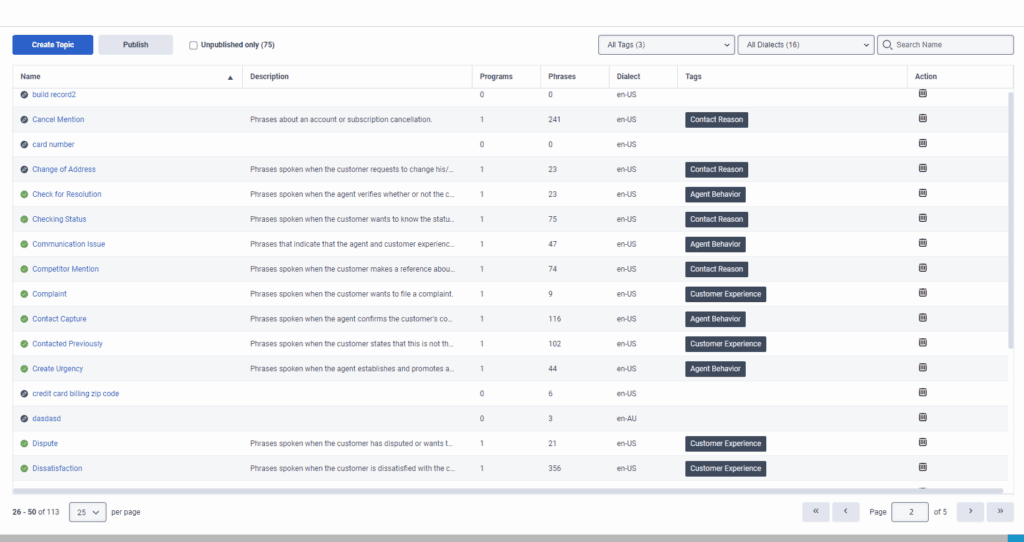
A topic is made up of phrases that represent a specific intent; for example, cancellation. Each program is associated with one or more topics.
Topic phrases for different languages
Depending on the language you use, topic phrases can boost voice transcription accuracy. However, in English and Spanish languages, topic phrases do not impact voice transcription.
Languages other than English and Spanish
Topic phrases help boost the recognition of specific words and phrases in voice transcription. They adapt the underlying language models to better recognize organization-specific terminology used in conversations.
English and Spanish languages
Topic phrases do not influence voice transcription accuracy. Topics continue to function for topic detection and analytics purposes, but they are not used to adapt the transcription process.
Work with topics
A topic encapsulates a business-level intent detected within interactions. Business level intents could be a call reason (for example, cancellation), an agent skill (for example, upsell attempt), or an indication of customer dissatisfaction (for example, escalation). Customers and agents have numerous ways to signal a business intent based on the words and phrases they say. As a result, a topic contains a set of phrases that indicate that business level intent. For example, if you want to identify interactions in which the customer wants to cancel an account, you could create a topic named cancellation with the following phrases:
- “close out my account”
- “I need to cancel”
When you include a topic in a program, the system searches for all phrases that the topic definition includes, in all the interactions that relate to the program. When one of the phrases is found, it is identified as an event and the topic is registered as found at a specific time during the interaction. Each identified event in an interaction has a start time, an end time, a name, and a type. For example if a topic called “Loan Officer” is identified by the phrase “can offer you a loan,” the start time is the second that the agent began to say “can.” The end time is when the agent finishes saying “loan.”
The more phrases that you add to a topic, the more useful the topic. For more information, see Work with a phrase.
After you create a topic, you can modify the topic based on the accuracy of the topic results.
Notes:
- Define topics before you add them to a program. However, you can change their contents after you add them to a program. The topic contents that are defined when the program is applied are the contents that the system searches for in interactions associated with the program.
- Surround words and phrases in double quotation marks (“) to ensure that they are mandatory during topic detection.
- During a consult or conference, when multiple agents are on a call, it is not possible to distinguish what each agent said. Therefore, any topics identified during a conversation, regardless of which agent was speaking, are associated with the first agent in the conference.
- When adding Korean phrases, you must add a space between words. If a phrase consists of only one word, you do not need more space before it. Adding a space between words ensures proper readability and adherence to Korean writing conventions.
- Topic limits:
- Topic spotting is performed only on the first 72,000 characters of an interaction (excluding spaces). Any content beyond this limit is not analyzed.
- Standard limit: 500 topics.
- Upon request, the limit can be increased to 5000 topics.
- Once the limit is increased to 5000 topics, it is not possible to revert the topics limit to 500 topics.
- The limit for specific dialects that you can select for filtering in the Topic editor page is 15.
- In the Topic Editor page, you cannot add the same topic to more than 10 programs. You can only add a specific topic to more than 10 programs in the Program Editor page.
- When you use Replace and Merge as part of the out-of-the-box (OOTB) topics process and more than 500 topics exist, then the topics table and the text “The following topics will be deleted” do not appear.
- When exceeding 500 topics, the Filter by Tag (applicable to both Topics Grid page and Program Editor page) is unavailable.
- AI-generated topic phrases:
- AI generates up to 10 phrase suggestions per request.
- AI phrase generation is limited to 100 requests per day per organization.
- AI suggestions are not used for detection until you review, approve, and save them as part of the topic.
Manage topics
[NEXT] Was this article helpful?
Get user feedback about articles.