Enable AI-based background noise suppression to WebRTC phones
Using a supported app from the AppFoundry, administrators can apply AI-based background noise suppression to outbound audio on WebRTC phones. Noise suppression processing happens entirely on the client side, on the WebRTC device. Genesys does not process, transmit, or store call audio.
Important: Only Genesys Cloud administrators can configure a supported noise suppression app. There are no agent facing controls.
Genesys Cloud currently supports the following noise suppression solutions:
Note: Genesys Cloud plans to provide support for other noise suppression apps in future releases.
Purchase the noise suppression app
- Visit the AppFoundry and search for a supported noise suppression app.
- Purchase the app and follow the vendor’s installation instructions. The installation procedure will be provide you with an app-specific permission.
- After the app is purchased, the app-specific permission will automatically become available in your organization.
Assign the app-specific permission to a role
- Click Menu > User Management > Roles and Permissions.
- Select the WebRTC role to which you want to add the noise suppression app-specific permission.
- Click the Permissions tab and select the All Permissions option.
- Enter the name of the app-specific permission in the Permission box.
- From the search results, select the check box next to the app-specific permission.
- Click Save.
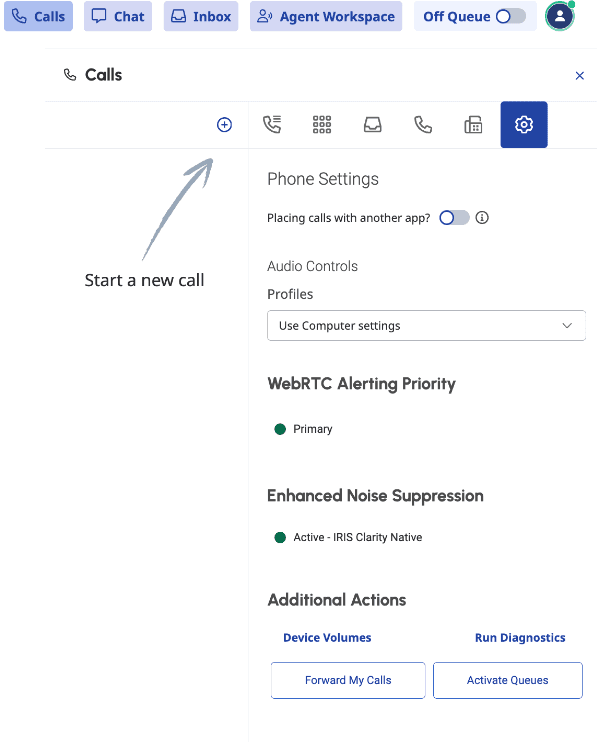
When the supported noise suppression app is running, every user assigned that role will have an Enhance Noise Suppression setting enabled on their WebRTC phone settings.
[NEXT] Was this article helpful?
Get user feedback about articles.