Define an agent’s role and guidelines
Series: Create an agentic virtual agent
Previous suggested step: Create an agentic virtual agent
Next suggested step: Set up tools for an agentic virtual agent
Establish the role, capabilities, and objectives of the agentic virtual agent and also outline the guidelines and best practices for its effective implementation and use. By design, a single agent is domain-specific and cannot handle all use cases or scenarios.
Define the role
Use the role to indicate the personality and branding that the agent represents. To confine the agent to its intended use, you can also specify what is outside its scope.
- Click Menu > Orchestration > AI Studio > Agentic Virtual Agents.
- (Optional) To search for a specific agent, start typing the name of the agent in the search box. As you type, the matching agents are shown.
- To open an agent, click the agent’s tile. The Agent profile view opens.
- Under Role, specify the agent’s intended personality, branding characteristics, and capabilities.
Set guidelines
Outline some instructions to the agent for the entire context of the conversation. The agent must follow these guidelines.
- Under Guidelines in the Agent tab, click Add. An empty text field appears.
- Write an instruction that guides the agent in its conversations. For example, “If a question is ambiguous, ask for clarification.”
- Add as many guidelines as needed to guide the agent throughout an interaction session.
- Click Save.
Navigating the agentic virtual agent profile
The profile contains the following sections and a preview widget:
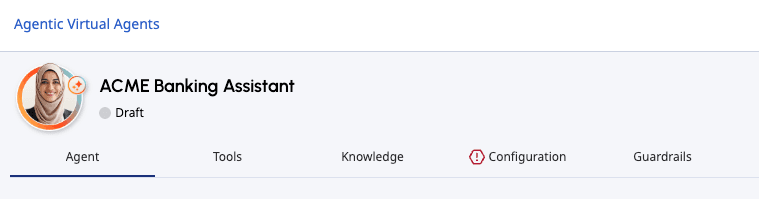
You can switch to any of the sections of the agentic virtual agent while creating a new agent, editing an existing agent, or viewing an agent. Any incomplete section is indicated by the icon preceding the section name. You can save an agent with an incomplete section but you cannot publish the agent until all sections are complete.
After you have completed all necessary sections of the agent setup, you can click Publish to publish the flow.

[NEXT] Was this article helpful?
Get user feedback about articles.