How can I report an issue with Genesys Cloud?
Contact your administrator about a problem in Genesys Cloud
- At the top of Genesys Cloud, click Help.
- From the Help panel, click, Resources > Contact Help Center.
- Type a description of your problem and review the results that appear.
- If you still need help, click Contact Help Center.
Click the image to enlarge.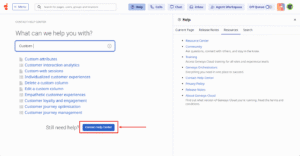
- Provide the appropriate details and click Submit.
Tell us about a problem in Genesys Cloud
To contact Genesys Cloud Customer Care, you must be a . Become a Designated Contact by first reviewing the Customer Areas of Responsibility. Then go to the Our Product Support Communications Portal log in page and select Get Started to request a My Support account and get access to our Genesys support tools. Allow 48 business hours to receive your credentials. For more information about Genesys Cloud Customer Care, see About Genesys Cloud Customer Care.
[NEXT] Was this article helpful?
Get user feedback about articles.