Genesys Tempo for Android documentation
How do I view the documentation for Genesys Tempo for Android?
Tap Settings. Then tap FAQ.
You can also view the FAQs on the Genesys Cloud Resource Center.[/bs_citem]
How do I log in to Genesys Tempo for Android?
To log in to Genesys Tempo for Android, perform the following steps:
- From the Regions list, select the region in which your organization was created.
- Tap Choose.
- Enter your email address and password, and tap Log In.
If the single sign-on (SSO) option is enabled, then perform the following steps:
- Tap More Login Options, enter your organization name.
- Authenticate with the identity provider. For example, OneLogin.
If I log in to Collaborate for Android, must I log in to Genesys Tempo for Android separately?
No, when you log in to Collaborate, you also log in to Tempo.
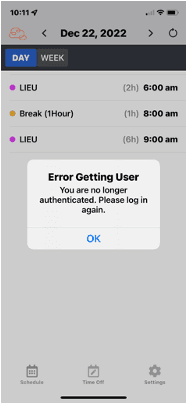
Why do I see the error getting User message?
You see the Error Getting User message if you are inactive and your administrator configures an inactivity timer for Genesys Cloud log in instances.
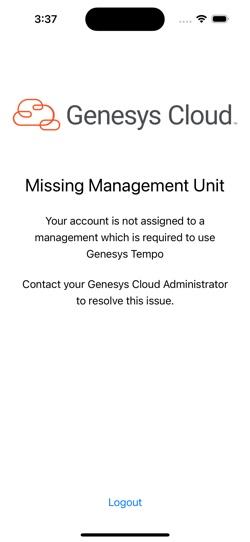
Why do I see the missing management unit message?
You see the Missing Management Unit message if you are not assigned to a management unit. Contact your supervisor or your Genesys Cloud Administrator to inform them about the issue.
[NEXT] Was this article helpful?
Get user feedback about articles.