FAQs: Platform
How can I tell what region I am in?
If you are not sure what region you are in, there are two ways to find out:
The login URL
The URL that you use to log in to Genesys Cloud is region-specific. Each Genesys Cloud log in URL and region is identified on the Core tab of the AWS regions for Genesys Cloud article.
For example, if your login URL is https://login.usw2.pure.cloud, then you are in the Americas (US West) region.
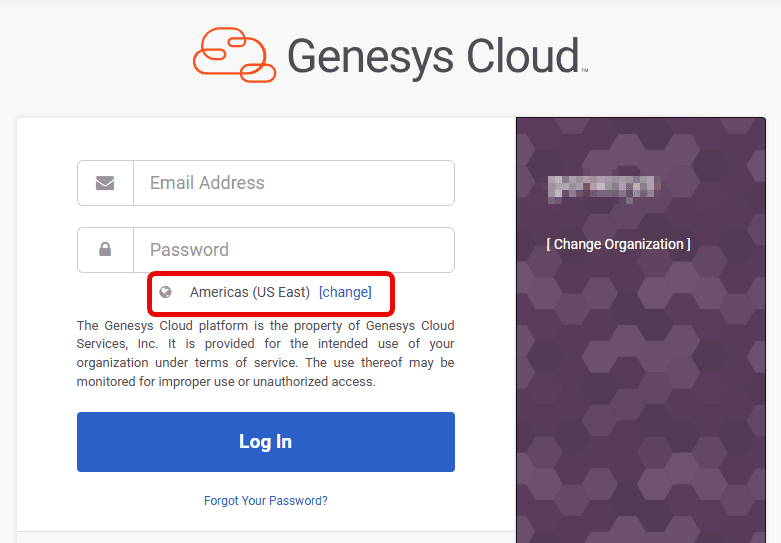
The login dialog box
The login dialog box shows the region that you are in.
Where can I find information about platform announcements, upcoming deprecations, and UI/UX changes?
Platform announcements, deprecations, and UI/UX updates, are categorized and available on the Announcements article. This page provides a record of user interface and experience changes, platform updates, and deprecations.
How are on-demand services different from add-ons?
Add-ons, which are additional licenses on top of a base license, allow you to use a host of services that are packaged with it. For example, if you purchased a Genesys Cloud CX 1 license, and you wish you engage with your customers across all channels such as web messaging, email, and SMS, you can purchase an add-on and extend your license capability to include all the three digital channels. For more information on add-ons, see Feature matrix.
However, if your business demands only SMS service, you can include SMS as an on-demand service in your contract. This will include only SMS and not the other offerings of the add-on, such as web messaging and email. For more information on the on-demand services, see Resource Services.
How do I receive notifications about updates to Genesys Cloud?
The following table explains how to receive specific notifications.
| Notification | How do I receive the notification? |
|---|---|
Genesys Cloud core features | Subscribe to Genesys Cloud feature release notes. |
Deprecations | Select the Deprecation tab in the Announcements page to check for updates. These deprecations appear in the release notes when the deprecation is announced in the release notes. |
Subscriber articles | Subscribe to key pages from the Subscribe articles tab in the Announcements page. |
UI/UX | Select the UI/UX tab in the Announcements page to check for updates. These updates appear in the release notes when the feature with the UI/UX change is released. |
Platform announcements | Select the Platform tab in the Announcements page to check for updates. |
FedRAMP features/changes | Subscribe to FedRAMP release notes. |
Media tier features | Subscribe to Media Tier release notes. |
Integrations updates | Select the Integrations release notes section in the Genesys Cloud Release Notes page. |
Desktop App updates | Select the Desktop app release notes section in the Genesys Cloud Release Notes page. |
iOS Mobile App updates | Select the iOS Mobile app release notes section in the Genesys Cloud Release Notes page. |
Does Genesys Cloud support RFC 4028?
Genesys Cloud supports RFC 4028. It will perform Session Refreshes using the UPDATE method if requested by an external SIP entity, and it will accept Session Refreshes using INVITE or UPDATE if the external party sends them. However, Genesys Cloud will not request Session Refreshes on any call; if they are desired the external party must perform them or must request Genesys Cloud to do so.
Does Genesys Cloud support RFC 3311?
Genesys Cloud supports the UPDATE method defined in RFC 3311, but does not support the use of UPDATE with SDP for updating the media session as described in the RFC. Support for UPDATE in Genesys Cloud is restricted to use for Session Refreshes, as defined in RFC 4028.
Is MMS available outside the US and Canada?
No. Genesys Cloud limits the support of MMS in the following ways:
- Long codes are only supported in the US and Canada.
- Toll-free long codes are only supported in the US and Canada.
- Short codes are only supported in the US.
- MMS only displays a limited number of media types.
For more information, see MMS overview.
What is the maintenance window for cloud-media services updates?
The maintenance window during which AWS cloud media services updates occur is 12:00 AM to 5:00 AM in every AWS region’s time zone. Genesys recommends that you not make any changes to your organization during the maintenance window.
You can find the actual date of the updates in the Media Tier Release Notes posts.
Does Genesys Cloud offer PCI DSS compliance?
Yes. For more information, see PCI DSS compliance.
Can I download media capture logs?
No. The log files generated by enabling the Media Capture setting are encrypted and only accessible by Genesys Cloud Product Support personnel. You should only enable the Media Capture setting when you are working with Genesys Cloud Product Support personnel. Enabling it generates a HPAA Packet File Format (HPAACAP) file that contains live packet streams that can be used for diagnostic and troubleshooting purposes. For more information, see Enable media capture.
Where can I find information about upcoming Genesys Cloud features or the product roadmap?
Genesys provides several resources to help you learn about upcoming Genesys Cloud features and changes:
- Genesys Cloud – Features coming soon – Preview features that are expected to be available in the next weekly Genesys Cloud release. Feature availability may vary based on factors such as region readiness, product licensing, and the Genesys Cloud release schedule.
- Genesys Cloud Announcements – Review advance information about significant upcoming user interface and user experience changes, platform changes, and deprecations. Announcements can help you identify changes that may require awareness, planning, or action before they become effective.
- Genesys Cloud release notes – Review features and changes that have been released to Genesys Cloud.
For longer-term product roadmap information, you can also use the following resources:
- Genesys Cloud roadmap webinars provide quarterly roadmap information and product updates. Invitations are sent to Genesys customers and partners. Contact your Genesys representative for more information.
- Review available roadmap information in Genesys Orchestrators. Additional roadmap information may require you to sign in with a customer or partner account.
For information about proposed product ideas and to submit or vote on ideas, use the Genesys Cloud Product Ideas Lab.
What are Genesys Cloud’s network requirements?
You can learn more about Genesys Cloud’s network requirements from the following articles:
Where do I find Genesys Cloud training?
Genesys Cloud training is located at https://beyond.genesys.com/explore/search;s=Genesys%20Cloud
How does Genesys Cloud address GDPR?
To learn more, see Genesys Cloud and GDPR compliance.