Configure auto answer in CX Cloud from Genesys and Salesforce
Feature postponement: Native Genesys auto answer has been temporarily postponed for the US-West region only. Please check Genesys Cloud - Features coming soon for updated availability information.
In CX Cloud from Genesys and Salesforce, administrators can configure auto answer in Genesys Cloud for incoming voice interactions. This capability enables contact centers to define auto answer behavior directly within Genesys Cloud at the queue, outbound campaign, or user level.
Warning: Do not enable both Salesforce Omni-Channel auto accept work requests and Genesys Cloud auto answer. Disable the Automatically accept work requests option set in the agent presence configuration or in the service channel.
To configure auto answer in Genesys Cloud, refer to the following topics:
- Auto answer incoming interactions
- Create and configure queues
- Turn on auto answer for agents
- Create a preview campaign
Auto-answered call notification
When auto answer is enabled, the call is automatically connected for the agent. A notification appears at the top of the console with the caller details while the Salesforce Voice Call record page loads.
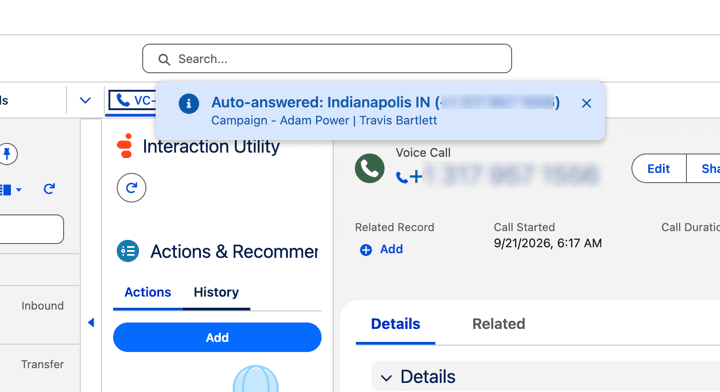
By default, the notification includes:
- Message title – The text Auto-answered, followed by the caller ID (as provided by the phone carrier) and phone number.
- Message detail –
Call type | caller's name | scv_autoAnswerDetails.- The call type is either
Inbound,TransferorCampaign. For campaign calls, the format isCampaign - Campaign Name | caller's name | scv_autoAnswerDetails. - The caller’s name appears only if an external contact is found.
- You can populate
scv_autoAnswerDetailsattribute with any additional message information to be displayed for the interaction. For more information, see Synchronize call attributes with Salesforce VoiceCall records for CX Cloud from Genesys and Salesforce.
- The call type is either
For more information, see Call controls in Omni-Channel and About CX Cloud from Genesys and Salesforce.
[NEXT] Was this article helpful?
Get user feedback about articles.