Configure Genesys Cloud CX Embeddable Component for user inbox
To allow agents to manage their personal voicemail messages and recordings in the CX Cloud from Genesys and Salesforce integration, administrators must add the Genesys Cloud CX Embeddable Component, which provides the Agent-inbox gadget for the contact center Lightning app.
Configure and add the component
In Salesforce, add the Genesys Cloud CX Embeddable Component as a utility item to your contact center Lightning app directly or as a custom component to the user record page.
For more information, see Create and Configure Lightning Experience Record Pages and Activate Lightning Experience Record Pages in the Salesforce documentation.
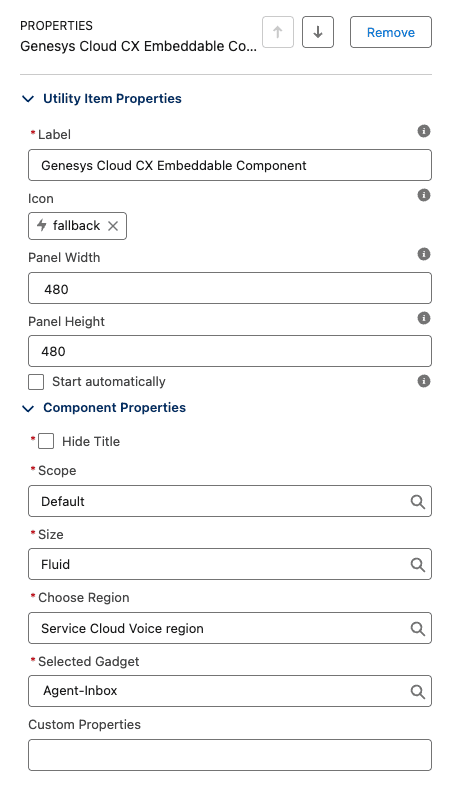
When you add the component, configure the following properties:
- Utility item properties
- Label – Enter a label name for the utility item to display.
- Panel Width – The recommended component width is 480 px or greater for optimal viewing.
- Panel Height – Enter the preferred height.
- Start automatically – This option is required when adding the component as a utility bar item. Enable it to automatically display voicemail notifications when new voicemails are received.
- Component properties
- Scope – Select Default as the scope.
- Size – Select Fluid as the size for the Agent-inbox gadget.
- Choose region – Select Service Cloud Voice region as the component for Service Cloud Voice.
- Selected Gadget – Select Agent-inbox as the gadget.
How it works
When an administrator adds the user inbox component to a Lightning page or utility bar, agents gain access to their personal voicemail messages and recordings directly within the Salesforce Service Cloud console. The user inbox component displays a list of all voicemails and recordings available to the user.
When an agent selects a voicemail, an embedded audio player opens inline within the component. The player provides controls to play, pause, and seek to a specific point in the voicemail. After the agent has handled a voicemail, they can delete it directly from the inbox. The list refreshes automatically when a new voicemail arrives or an existing one is deleted.
If the component is docked in the utility bar, an unread count badge appears on the component icon. The badge count increased when a new voicemail is received and decreases when a voicemail is played, allowing agents to easily identify voicemails that need attention.
For more information, see Access voicemail and recordings in CX Cloud.
[NEXT] Was this article helpful?
Get user feedback about articles.