Genesys Cloud – Core attribute change rules for work automation
In a future release, Genesys Cloud will enable administrators to create worktype rules that trigger workitem flows when core workitem attributes change. Administrators can create rules based on changes to assignment state, priority, queue, assignee, and language, and combine multiple conditions to control more precisely when a workitem flow runs.
What’s changing
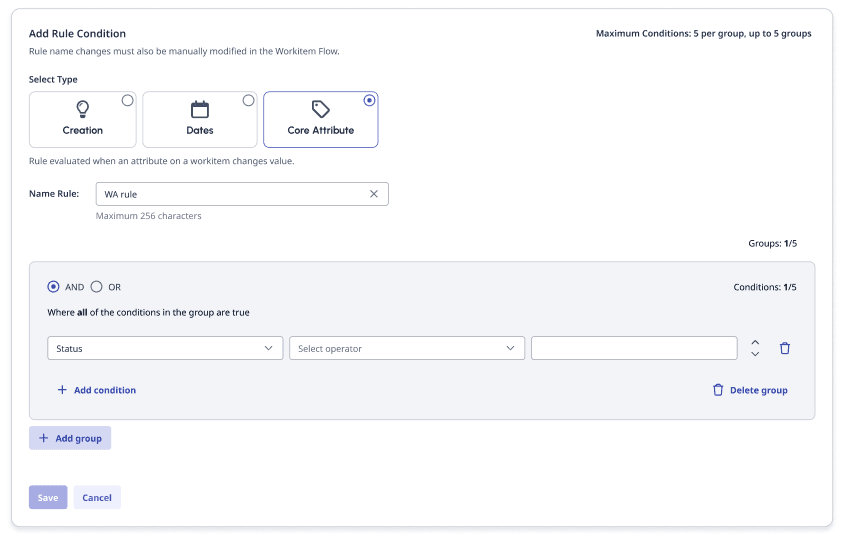
- Core attribute rules – Administrators can create rules that evaluate changes to core workitem attributes, including assignment state, priority, queue, assignee, and language.
- Assignment state transitions – Administrators can trigger rules based on specific assignment state transitions, such as when an agent connects to, parks, declines, transfers, or disconnects from a workitem.
- Condition groups – Administrators can create up to five condition groups and combine groups with AND or OR logic. Each group can contain up to five conditions.
- Multiple conditions – Administrators can combine attribute conditions to define more specific circumstances in which a workitem flow should run.
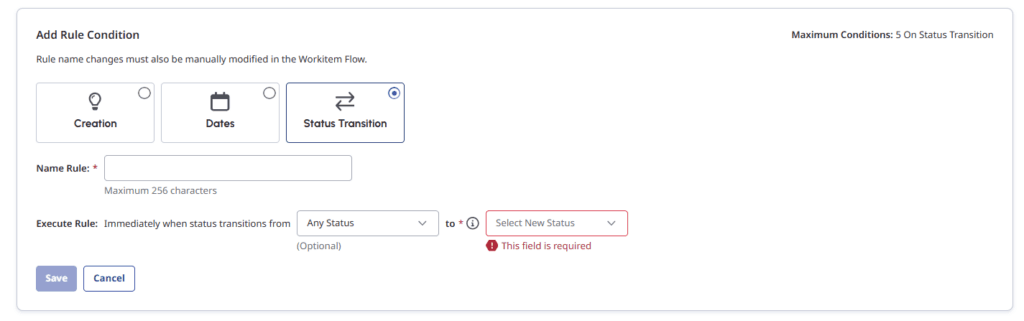
Create rules before and after
Why this matters
Core attribute change rules allow administrators to automate work based on what happens to a workitem after its creation. For example, an administrator can trigger a flow when an agent parks a workitem to support a snooze process, update a workitem status when an agent connects to it, or escalate a workitem when routing fails. This reduces manual work for agents and allows organizations to respond automatically to changes in a workitem’s state.
Action required
No action is required. Administrators can create core attribute change rules when they want to automate workitem flows based on changes to supported workitem attributes.
[NEXT] Was this article helpful?
Get user feedback about articles.