Schedule a callback
You can schedule callbacks for ACD voice interactions (call, callback, outbound dialing, and voicemail).
- Click Schedule a callback in the call controls.
- Type or select the date.
The date defaults to the current date.
Note: You cannot schedule a callback for more than 30 days in advance. - Type or select the time.
The time defaults to 30 minutes after the current time.
- (Optional) Type or select a time zone for the person that you want to call.
- Update the phone number, if necessary.
The phone number defaults to the caller’s ANI.
- (Optional) If your admin has enabled the option to assign the callback to a specific queue, type or select a queue for the callback.
For more information, see Enable agents to specify a queue for scheduled callbacks.
- To route the callback to you, select Route callback to me if possible. By default, scheduled callbacks route to the queue that received the original interaction.
- (Optional) If your admin has enabled owned callbacks, then you can select Take Ownership to take ownership of the callback.
The behavior of agent ownership depends on how your administrator has configured the callback type for the queue — Agent First or Customer First. For more information, see Agent-owned callbacks section.
- Click Schedule. Note: You cannot schedule multiple callbacks for a single interaction. After you schedule a callback, the Schedule button becomes unavailable.
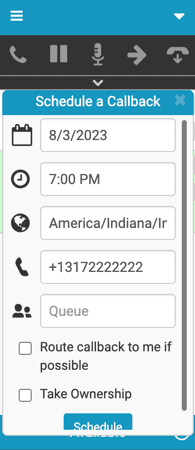 Schedule Callback window that shows the selection of queue option." class="size-full wp-image-310716 alignleft" srcset="https://help.mypurecloud.com/wp-content/uploads/2023/08/schedule-clbck-with-queue.png 195w, https://help.mypurecloud.com/wp-content/uploads/2023/08/schedule-clbck-with-queue-130x300.png 130w" sizes="auto, (max-width: 195px) 100vw, 195px">
At the scheduled date and time, Genesys Cloud sends the callback to the queue or agent that handled the original interaction. For more information about handling callback interactions, see Respond to callback interactions.
- A caller ID and caller name can be specified for a callback when created through an API call. For more information, see
/api/v2/conversations/callbackand/api/v2/conversations/{conversationId}/participants/{participantId}/callbacksin Conversations in the Developer Center. - Users with the Genesys Cloud Supervisor default role can cancel callbacks. For more information, see Scheduled Callbacks view.
Agent-owned callbacks
When you select Take Ownership while scheduling a callback, the behavior depends on how your admin has configured the callback type for the queue — Agent First or Customer First. Your admin also controls:
- How far in advance you can schedule an owned callback, ranging from one hour to 30 days
- How long the ownership period lasts, ranging from one hour to 30 days
- Whether the call is assigned to a queue when ownership expires
| Agent first callback type | Customer first callback type | |
|---|---|---|
| How it works | You are connected to the call while the system dials the customer and handles the call progress directly. | Genesys Cloud manages the callback on your behalf. You are not on the line during dialing. The system dials the customer and connects you only after the customer answers. Retries are handled automatically. If the customer does not answer, Genesys Cloud retries according to your admin’s retry settings and no action is required from you. If the customer first callbacks are agent owned:
|
| Ownership period expires before you become available |
|
|
| If you go off queue after being reserved | N/A |
|
| On successful connection | You can wrap the call or schedule any follow-up callbacks. | Your reservation is released. You can then wrap the call or schedule any follow-up callbacks. |
| On unsuccessful connection | N/A | The system retries and reserves you again before the next dial attempt based on the retry callback queue configuration. |
For more information, see Call controls.
For more information about how to configure an agent-owned callback in queues, see Create and configure queues.
For more information about the integrations, see About Genesys Cloud Embeddable Framework, About Genesys Cloud for Salesforce, About Genesys Cloud for Microsoft Teams, and About Genesys Cloud for Zendesk.
[NEXT] Was this article helpful?
Get user feedback about articles.